
Source: Anthropic Academy / Skilljar course, developed with Prof. Rick Dakan (Ringling College) and Prof. Joseph Feller (UCC). Framework released under CC BY-NC-SA 4.0. Note: full lesson content is gated behind Skilljar login — these notes are built from the public curriculum, Anthropic’s own framework PDFs, and course description. Treat the framework itself as accurate; treat lesson-specific wording as inferred, not quoted.
Why this matters for us specifically
Most “AI for developers” content is really just prompt tricks — how to phrase things so Claude/Copilot/ChatGPT gives you nicer output. This course is one level up: it’s a framework for deciding when and how to hand off work at all, and how to stay accountable for what comes back. That distinction matters more in iOS than in, say, generic web scripting, because:
- Swift/SwiftUI APIs churn every WWDC — models trained months ago will confidently generate deprecated or half-hallucinated API calls (
@availableguards, oldNavigationViewvsNavigationStack, wrongasync/awaitpatterns). - App Store review, crash-free rate, and memory correctness (ARC, retain cycles, actor isolation) are places where “looks right” and “is right” diverge a lot — exactly where uncritical AI use bites you.
- Delegating too much on architecture decisions (concurrency model, persistence layer, DI) can quietly bake in choices you’ll be stuck maintaining for years.
The framework gives you a repeatable mental checklist instead of vibes.
The Core Model: 3 Modes of AI Interaction
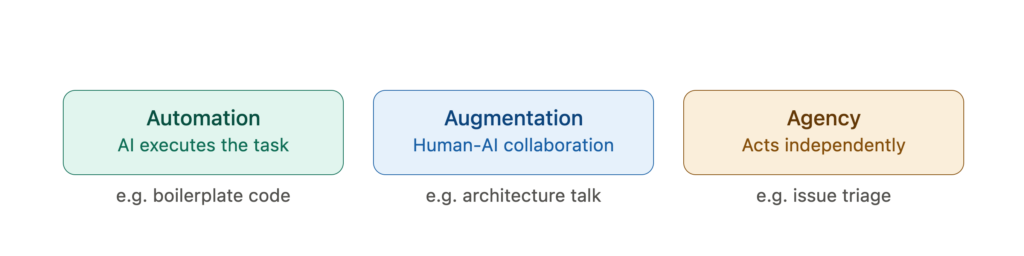
Before the 4Ds, the course sets up how you’re working with AI in a given moment:
| Mode | What it means | iOS example |
|---|---|---|
| Automation | AI executes a specific task on your instruction | “Generate a Codable struct from this JSON payload” |
| Augmentation | AI and you collaborate as thinking partners | Pair-designing a view model’s state machine, debating MVVM vs TCA for a feature |
| Agency | AI is configured to act independently over time | An agent that triages your GitHub issues, or a CI bot that auto-drafts PR descriptions |
Takeaway: most of your Xcode-adjacent AI use today is Automation (autocomplete, snippet generation). The place you’re probably underusing AI is Augmentation — using it as a rubber-duck for architecture/tradeoff discussions, not just code generation. Agency is where things like Claude Code / agentic coding tools live, and it’s also where diligence risk is highest (see below).
The 4D Framework
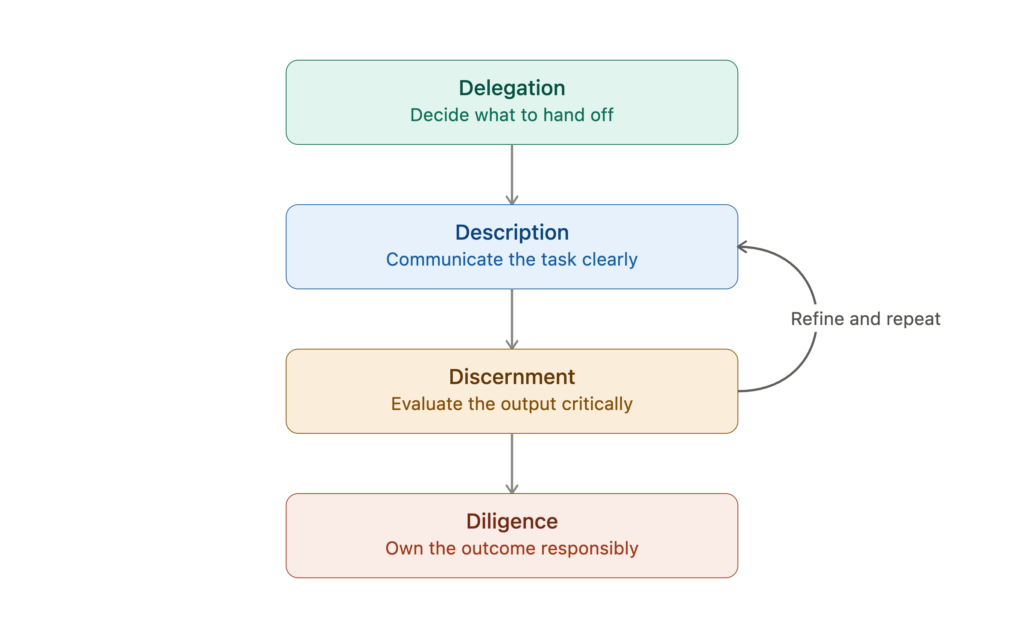
1. Delegation — deciding what to hand off, and to whom
Not “can AI do this” but “should I have AI do this, and how much of it.”
Sub-skills called out:
- Problem awareness — know your actual goal before you type a prompt. If you don’t know whether you want “a working prototype” or “production-ready code,” neither will the model.
- Platform awareness — know the tool’s limits: context window size, training cutoff, known hallucination patterns for the domain you’re in.
- Task distribution — split work along the seam of “what am I better at” vs “what is the model faster/more thorough at.”
iOS-flavored delegation heuristics:
- ✅ Good to delegate: boilerplate (Codable models, mock data, unit test scaffolding, repetitive SwiftUI view variants, regex, string parsing, migration scripts).
- ⚠️ Delegate with a tight leash: concurrency code (Swift Structured Concurrency, actors), anything touching memory lifecycle, Core Data / SwiftData migrations.
- 🚫 Don’t fully delegate: architectural decisions with long-term maintenance cost, security-sensitive code (Keychain, auth flows), App Store compliance logic.
- Practical move: before you prompt, decide out loud (even just in a comment) what a good outcome looks like and how you’ll know if it’s wrong. That’s Delegation done properly — most devs skip straight to prompting.
2. Description — communicating the task well
The course explicitly reframes this beyond “prompt engineering” — it’s a professional communication skill, not a technical trick. Persona, context, constraints, and examples reliably beat minimal prompts on complex tasks.
For iOS work, a strong prompt usually includes:
- Target Swift/iOS version (
iOS 17+,Swift 6, strict concurrency on/off) - Architecture context (“this is MVVM with a
@Observableview model, not Combine”) - Constraints (“no third-party deps,” “must work offline,” “SwiftUI only, no UIKit bridging”)
- What “done” looks like (unit-testable? has previews? handles error states?)
- 1 concrete example of existing code style in the repo if you want consistency
Deep Dive 2 in the course is specifically “Effective prompting techniques” — worth treating as its own mini-module if you want to level this up further; it’s the most directly actionable part for day-to-day coding.
3. Discernment — critically evaluating what came back
This is where most mid-level devs are weakest — not because they can’t spot bugs, but because plausible-looking Swift compiles and runs even when it’s subtly wrong (race conditions, retain cycles, wrong actor isolation, silently-swallowed errors).
Discernment checklist for AI-generated iOS code:
- Does it actually build against the SDK version you’re targeting, or does it use an API that’s deprecated/renamed/doesn’t exist?
- Does it handle the concurrency model correctly (is that closure actually
@MainActor-safe)? - Does it match your project’s error-handling convention, or does it just
try!/force-unwrap its way to “working”? - Would this pass code review from you, if a junior submitted it verbatim?
Key framework point: Discernment isn’t a one-time check — it feeds directly back into Description. That’s the next concept.
The Description–Discernment Loop
Framed as a continuous refinement cycle, not a linear pipeline: you describe → get output → discern what’s wrong/missing → refine the description → repeat. Good AI collaborators iterate 2–3 times rather than accepting or rejecting on the first pass.
Practical habit: when output is wrong, don’t just fix it by hand — figure out why your description let it go wrong, and fix the prompt too. Otherwise you’re debugging the same category of mistake every single time.
4. Diligence — owning the outcome
The “after the output” step most courses skip. Three sub-flavors called out in the framework materials:
- Creation diligence — being thoughtful about which model/tool you use and why (privacy of proprietary code, licensing of training data, cost).
- Transparency diligence — being honest with your team/reviewers about what was AI-assisted, especially in a code review or when it affects IP/licensing questions.
- Deployment diligence — you own it once it ships. “The AI wrote it” is not a defense for a shipped bug or a security hole.
iOS-specific diligence flags:
- Don’t paste proprietary/internal SDKs or unreleased-product code into tools without checking your company’s data policy.
- License-check any non-trivial generated algorithm if you’re at all unsure it’s “clean-room” (rare for typical CRUD/UI code, more relevant for anything algorithmically distinctive).
- If a PR is heavily AI-generated, say so in the description — it changes how a reviewer should read it (they should raise their Discernment bar, per the loop above).
Where the course also goes deeper (per curriculum, not fully verified content)
- Deep Dive 1 — What is Generative AI: fundamentals + capabilities/limitations (hallucination, context window, training cutoff). Worth a skim even if you’re technical, because it’s framed for decision-making about AI use, not just “how transformers work.”
- Project planning and Delegation: applying delegation thinking at the project level, not just per-prompt — i.e., deciding at kickoff which parts of a feature are AI-first vs human-first.
The one-paragraph version to remember
Before you prompt: decide what you’re actually delegating and why (Delegation). When you prompt: give it the context a competent teammate would need (Description). When it answers: read it like you’re the one signing off on the PR, not like you’re grateful it’s over (Discernment), and use what’s wrong to sharpen your next prompt (the loop). After it ships: it’s your bug, your license risk, your call — own it (Diligence).